
The following instructions explain how to generate a .har file from your network console that you can send to ISKME Support to help us troubleshoot your issue.
To generate a .har file in Chrome:
Open Chrome and go to the page where the issue occurs
Look for the ⋮ button and select More Tools > Developer Tools
Select the Network tab from the panel. Keep the menu open when you reproduce the issue.
Look for a round record button in the upper-left corner of the tab and ensure it is red. If it is grey, click the button to start the record process.
Check the Preserve log box
Click the grey crossed circle button to clear existing logs from the network tab
Reproduce the issue when the network records requests
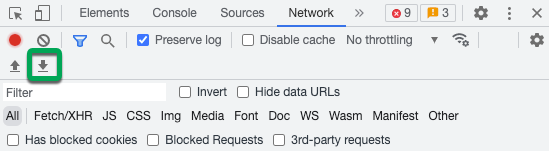
Click the download button, Export HAR, to download and save the file to your computer and select Save as HAR with Content.
Send the .har file to ISKME as an email attachment.